
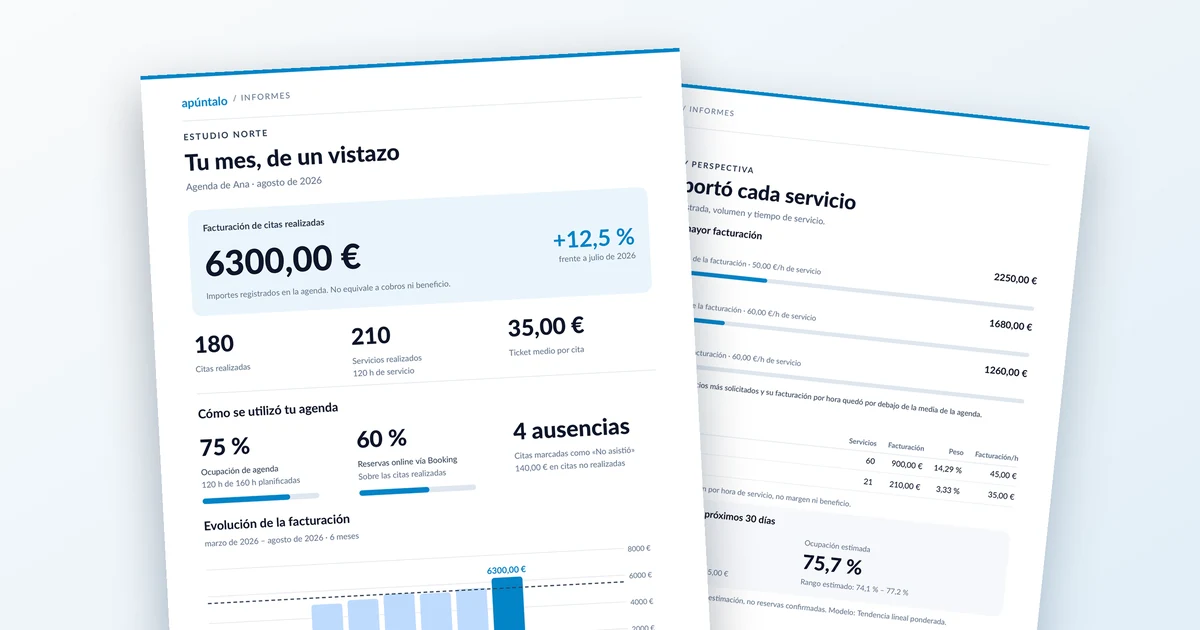
Every month, Apúntalo sends you a report on your diary’s activity. We want you to know where each figure comes from, so you can rely on it and, if something doesn’t add up, know what to check.
Quick summary
| Figure | How we calculate it |
|---|---|
| Completed appointments | Appointments in your diary with a client, services and prices that are not marked as “No-show” |
| Revenue | Sum of the amounts of completed appointments |
| Average ticket | Revenue ÷ completed appointments |
| No-show rate | No-shows ÷ (completed appointments + no-shows) × 100 |
| Occupancy | Booked minutes within your working hours ÷ minutes of your working hours × 100 |
Each report covers one diary. If several people work in your business, each diary has its own report.
1. Which appointments count as completed?
An appointment counts as completed if:
- It is still in the diary, meaning it has not been cancelled.
- It is not marked as “No-show”.
- It has a client assigned.
- It includes at least one service.
- All its services have a price.
- Its total amount is greater than zero.
If an appointment has several services, one of them can cost 0 (for example, a complimentary service), as long as the total is greater than zero. What it cannot have is a service with an empty price: 0 is a price; an empty field is not.
Appointments missing the client, a service or any price do not appear in any figure of the report.
2. Revenue and average ticket
Revenue is the sum of the amounts of all appointments completed during the month.
It reflects what you have recorded in your diary, not necessarily what you have collected or your business’s profit.
The average ticket is revenue divided by the number of completed appointments.
3. No-shows
A no-show is an appointment marked as “No-show” that meets the other conditions in section 1: client, services and prices.
No-shows don’t add to revenue or to completed appointments, but they are shown separately so you know how many you’ve had.
The no-show rate is calculated by dividing no-shows by the sum of completed appointments and no-shows, and multiplying by 100. For example, with 80 completed appointments and 5 no-shows, the rate is 5.88%.
What if the client tells you on WhatsApp they can’t come?
When a client taps “Cannot attend” in the WhatsApp reminder, we let you know, but the appointment stays in your diary. That way you can decide what to do, for example move it to another day.
- If they let you know in time and the appointment won’t happen, cancel it. That way it counts neither as completed nor as a no-show.
- Use “No-show” only when the client didn’t turn up.
If you mark an appointment the client cancelled in advance as “No-show”, your no-show rate will look higher than it really is.
4. Diary occupancy
Occupancy shows how much of your planned working hours was taken up by completed appointments.
- Only your working hours count. Time from appointments outside them doesn’t increase occupancy, and days marked as holidays or rest days don’t add planned hours.
- Overlapping appointments count once. If two appointments overlap, the shared minutes are counted only once.
- Only completed appointments count. An appointment without a price or without a client doesn’t add to occupancy, even if it takes up a slot in your diary.
Example day. Your working hours are 10:00 to 14:00 (240 minutes). You have an appointment from 10:00 to 11:00, another from 10:30 to 11:30 that overlaps with the first, and another from 13:30 to 14:30.
- From 10:00 to 11:30 there are 90 booked minutes; the overlapping half hour counts only once.
- From 13:30 to 14:00 there are 30 minutes; the following half hour is outside your working hours.
That’s 120 of 240 minutes in total: 50% occupancy. At the end of the month we add up every day: with 160 planned hours and 80 booked hours, occupancy would also be 50%.
Before the month ends
To make sure your report reflects reality:
- Assign a client to every appointment.
- Check that your services have a price.
- Cancel appointments that won’t happen.
- Mark clients who didn’t turn up as “No-show”.
- Keep your working hours up to date, including holidays and rest days.